Files
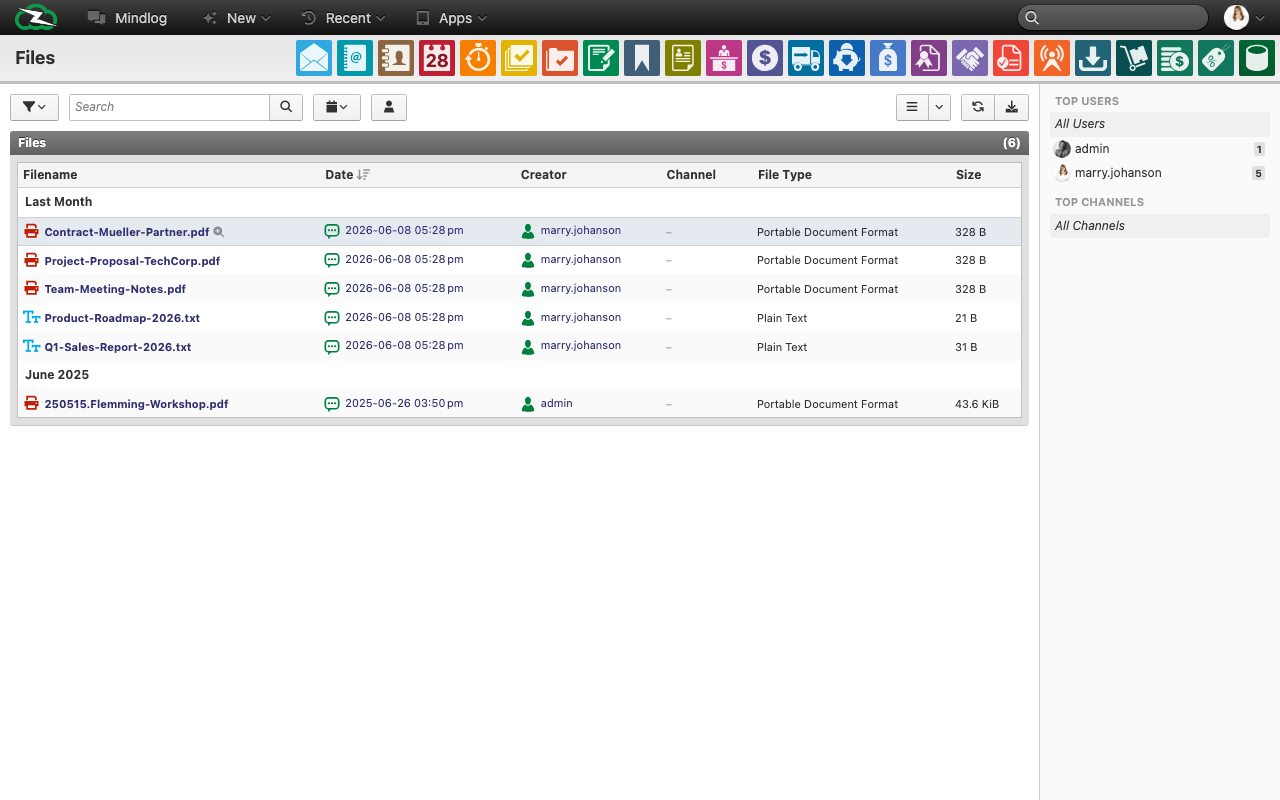
The Files page is the live file browser of ZeyOS. It shows stored uploads and generated files independently of the structured Documents module.
What This Page Is For
Use Files when you want to browse what is actually stored in the system, regardless of whether the file belongs to a document record, export, transaction output, or another source.
What You See on the Page
The live page includes a date filter and a list with fields such as:
- Filename
- Date
- Author
- Channel
- File type
- Size
The sidebar also supports top-user and top-channel style filtering. Use the date-range dropdown to narrow the list to recent uploads, a specific month, or a custom period.
Files vs Documents
Use Files when you need the stored binary itself. Use Documents when you need a document record with status, assignee, visibility, and numbering.
Typical Use Cases
- Find a recently uploaded spreadsheet or generated PDF.
- Review which user created or uploaded a file.
- Browse file output by date range.
- Trace which files exist even when no one remembers the exact parent record immediately.
Best Practices
- Use Files for discovery and retrieval, not as the primary business workflow for controlled documents.
- If a file needs workflow state or ownership, create or use a document record.
- Keep filenames meaningful because the Files page exposes them directly.