Opportunities
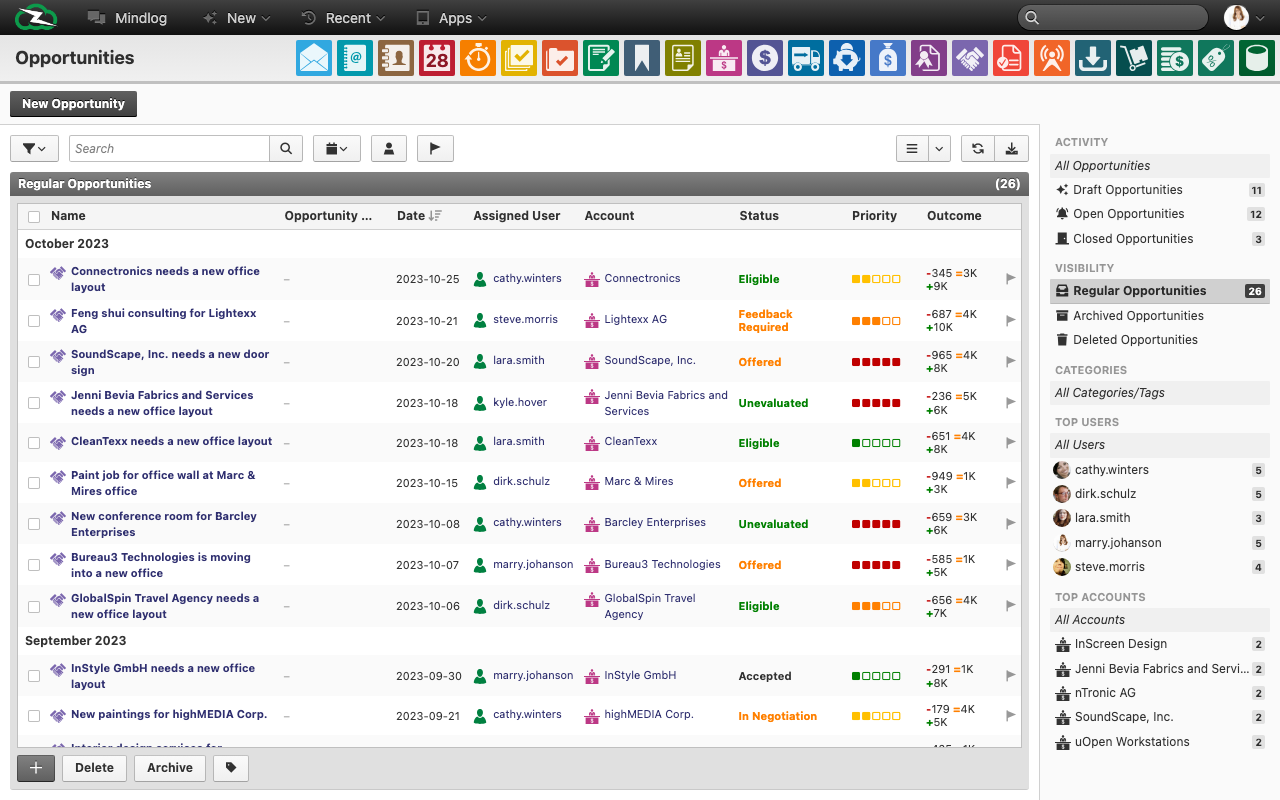
The Opportunities module is the pipeline view for potential business in ZeyOS. It combines commercial context, responsibility, status, and result estimation in one list.
What This Page Is For
Use Opportunities when a lead, prospect, or commercial chance should be tracked through a pipeline rather than managed as an informal note.
What You See on the Page
The live opportunities list includes fields such as:
- Name
- Opportunity No.
- Date
- Editor / Assignee
- Account
- Status
- Priority
- Result
The live system also uses status filters such as:
- Unevaluated
- Feedback required
- In negotiation
Understanding the Result Field
The result field is where many users need more explanation. In practice, it represents the commercial expectation of the opportunity, often using a three-point range rather than a single number.
In the live data, this appears as a compact notation such as a negative or low-end amount followed by likely and high-end values. Treat it as a structured revenue expectation, not as a simple invoice amount.
The clearest training rule is:
- low value = downside or conservative case
- middle value = most likely case
- high value = optimistic case
Teams should agree internally which of those numbers they use for forecast discussions.
Typical Workflow
- Create the opportunity and link it to the correct account.
- Assign responsibility and set a realistic status.
- Record the commercial expectation in the result fields.
- Update the opportunity as the deal moves through evaluation, feedback, and negotiation.
- Hand successful deals over to the sales process in Invoicing.
Best Practices
- Use statuses consistently across the team.
- Keep the linked account accurate from the start.
- Update result expectations as new information becomes available.
- Do not confuse pipeline expectation with booked revenue.
Related Topics
- Campaigns - Opportunities can be created or influenced by campaigns.
- Business Accounts - Commercial relationships start there.
- Invoicing - Won business moves there.