Logs, Audit, and Demo Data
This area covers the monitoring and support-oriented pages of the Control Center. It helps administrators understand background activity, prepare support cases, and assess whether traceability features are available.
What This Area Is For
Use these pages to inspect technical events, understand change traceability, and coordinate sandbox or training data with support.
Who Should Use It
These pages are relevant for administrators, support coordinators, and technical owners. Everyday end users normally do not need them.
Included Pages and Functions
| Page or tile | Purpose |
|---|---|
| Logs | Review technical events and operational background activity |
| Audit | Track write-level data changes if the feature is enabled |
| Demo Data | Understand whether training or sample data can be installed |
What You See in the Live System
Logs
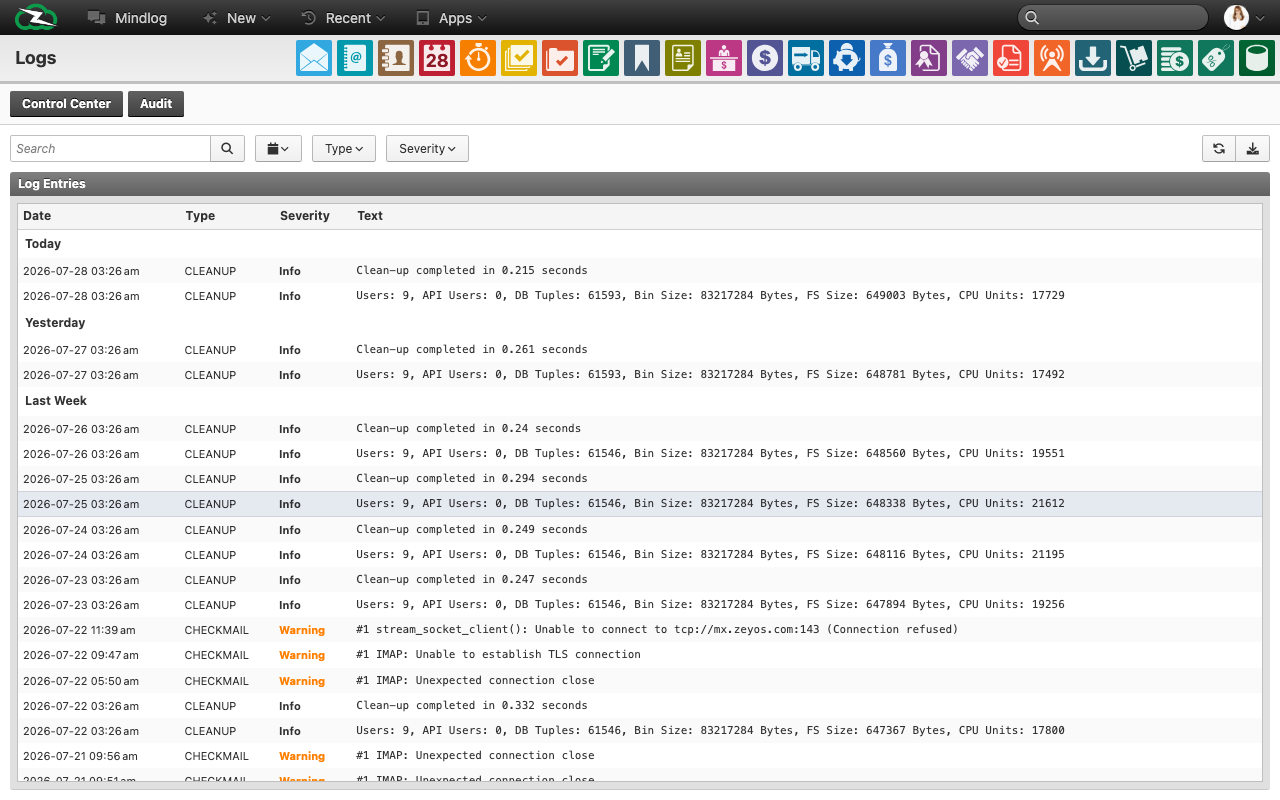
The live logs page supports filters for:
- Time period
- Log type
- Severity
The list itself includes entries with date, type, severity, and message text. In the demo environment, typical entries include clean-up jobs and utility commands.
Audit
The audit page is present in the live environment but not active by default. This means the feature may need to be enabled by ZeyOS support before it can be used for compliance or traceability work.
Demo Data
The live Control Center indicates that demo data is support-managed. This is useful for onboarding, workshops, or sandbox scenarios, but not for production environments.
Typical Use Cases
- Verify that recurring background jobs are completing normally.
- Collect technical context before opening a support request.
- Confirm whether audit logging is available for compliance-related questions.
- Coordinate training datasets for a workshop or onboarding environment.
When to Escalate
Contact support if:
- repeated warnings or errors appear in the logs
- audit data is needed but not available
- demo data must be installed or refreshed for training purposes
Best Practices
- Review logs for patterns rather than isolated lines.
- Treat audit as a formal traceability feature, not a replacement for process documentation.
- Keep demo data out of productive environments.
Related Topics
- Admin Functions - Subscription and support coordination often happen nearby.
- Extensions and Developer Tools - Technical diagnostics continue there.